
Cases you see
What the counselor sees on Review, as a board member or not, and how to raise a case yourself.
Review is the school's review board: appeals about entries, concerns from staff or families, and patterns the system flags for a look. What you see there depends on whether the head has named you to the board.
If you sit on the board
You see every case, open to decided, and you take part in the decisions. With two or more people on the board, a decision one member records is a proposal until another confirms it.
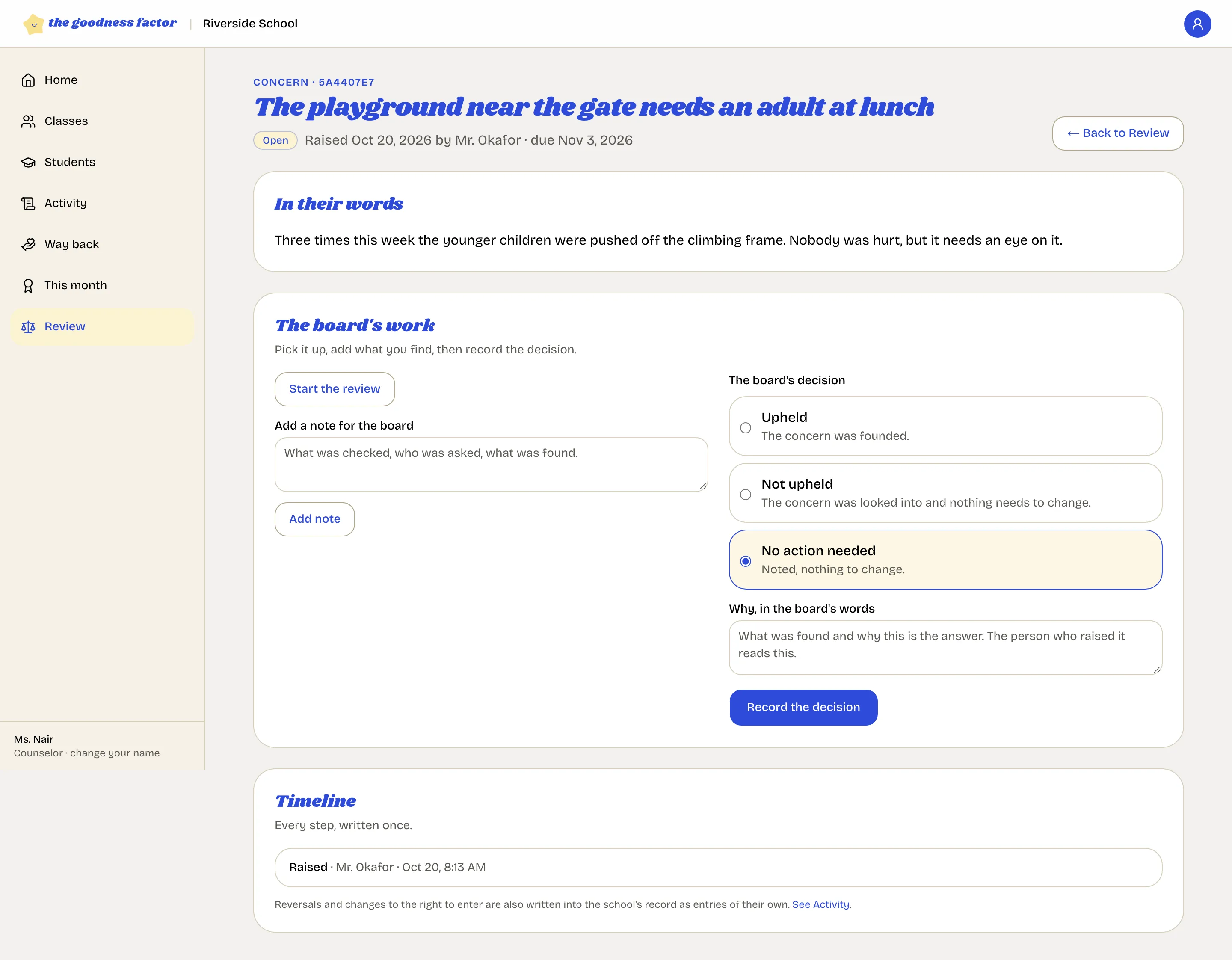
The board's work on a case, in order: Start the review, Add a note for the board as you look into it, then Record the decision with the reason in the board's words: upheld, not upheld, or no action needed. See The review board for reversals and the two-person rule.
If you do not
You see the cases you raised and any about entries you entered, with the board's answers. Everything else on the board stays with its members.
Raise a case
Raise an appeal or a concern on Review. An appeal names an entry (open it from a child's history or from Activity with "Question this entry"); a concern can be about anything. You can keep your name out of it.
Flags
Once a day the app looks at the previous day for patterns and opens a case with the numbers and no judgment: many entries by one person in a day, most of one person's entries for one child, the same act repeated for a child, late-night entries. The board decides what they mean. Most mean nothing; the point is that someone looks.