
For teachers
The classroom screen
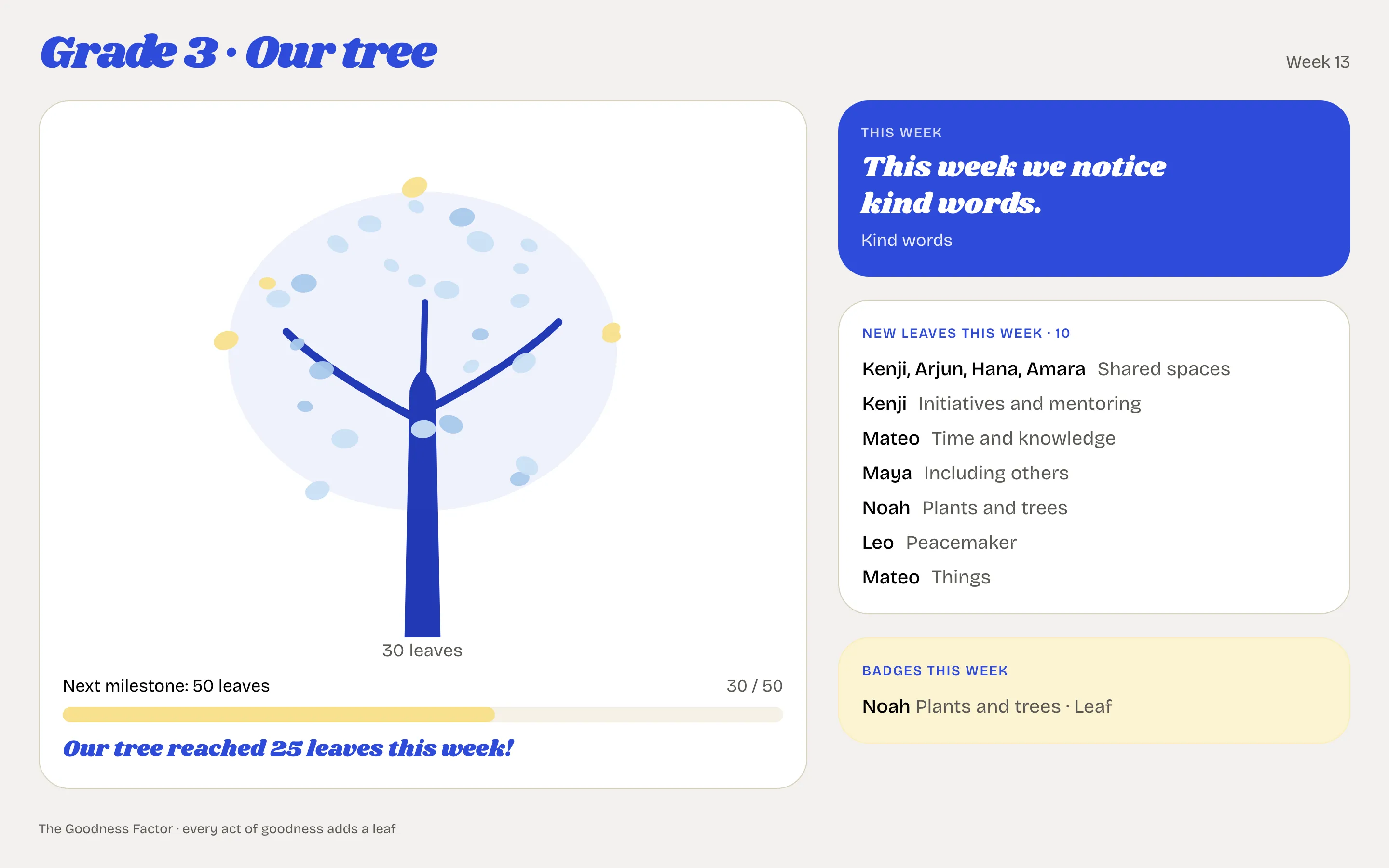
The class tree on a projector: leaves, first names, the focus of the week, the badges. Never a total.
The classroom screen is the class tree, live, on a screen or projector in the room. Every act adds a leaf; the class watches it grow together. It shows first names and never a total, a rank or a deduction.
Put it on the projector
- Open the class page and find The classroom screen.
- The address is shown. Copy the address and open it in the browser on the classroom computer, or scan it from a phone. No sign-in is needed, and the screen refreshes itself.
- Leave it up. It is a page anyone with the address can open, which is why it shows first names and leaves and nothing else.
If the address gets out
Replace it makes a new address at once, and the old one stops working. Withdraw it turns the screen off until you make a new one. Only the class's teachers and the head can do either.
What the screen shows
- The tree and its leaves, with the next milestone.
- This week: the focus of the week, in the words you or the head wrote.
- New leaves this week, by act, with the first names of the children who added them.
- Badges this week: a Leaf, a Flower or a Fruit reached.
It never shows points, totals, a ranking, a deduction or a surname.
Signed in
The same screen is available from the class page with Open on the projector, which works for a teacher who is signed in on the classroom computer.